
If you’ve ever sold something on eBay or Poshmark and then spent 20 panicked minutes tearing your space apart looking for it — this article is for you.
After losing my first item, telling the customer, and cancelling the order, I told myself never again. I bought some inventory stickers, and a large notebook. I spent hours writing down inventory numbers and creating a system.
Time went on and I thought that would be fine, but as the business grew, so did the chaos. I was still throwing things into boxes convinced I would remember where everything was. Spoiler: I didn’t. My notebook, well it was not sustainable. I struggled to read my own writing, used a lot of White-Out, and kept losing it too. You read that right, I would lose the notebook that was supposed to keep me on track.
One day I spilled a drink all over it, basically ruined. I told myself I would fix it later, come up with a better system. Before I could, I sold an expensive item that I could not find. I found it a few days later & reached out, but the customer no longer wanted it. I’m sure she did not have any trust in me. I was embarrassed, frustrated and out some money that I really needed at the time.
So I sat down, did some research, and after some trial and error, I built an inventory system for resellers that actually worked for me. One that meant I could find any item quickly no matter how many boxes I had or how long ago I listed it.
Here’s exactly how it works.
Start before you even take pictures
A good inventory system starts before you ever open your listing app. It starts the moment inventory comes through your door.
When new items arrive I sort them immediately. New items go onto hangers and get steamed. Everything else goes into the laundry. Once washed, anything that wrinkles easily goes on a hanger. Everything else gets folded neatly and stacked.
This matters because chaos at the intake stage creates chaos everywhere else. If items are wrinkled, unclean, or just thrown in a pile, your photo day takes twice as long and your listings suffer. This also helps to prevent death piles.
Photo day is a system, not a scramble
I photograph 20 items at a time, three days a week. The day before photo day I make sure I have 20 items ready. The evening before or morning of I set up my photo station with everything I need within two steps:
- Walmart bread bags or zip top bags
- Tape
- Thank you stickers
- Inventory number stickers (I order these on Amazon in rolls of 500)
- Pointer stick
- Scale
- Ruler
- Lint roller
- Empty corrugated box for processed items
Everything within two steps. Less movement means faster work.
For each clothing item I photograph the full front, full back, close ups of any graphics, pockets, or special details, the brand and material tags, measurements, and any flaws or stains — using my ruler or pointer stick to show exactly where. No surprises for the buyer means fewer disputes later.
You don’t have to do 20. You can do 5 or 50, whatever works best for you and your business. Photography can be a drag, so I highly recommend playing some music, your favorite podcast or play some of your favorite YouTube thrifter videos. I always feel more motivated when there is some background noise.
The packaging and numbering step — this is the key
Once photos are done, here’s where the real system kicks in.
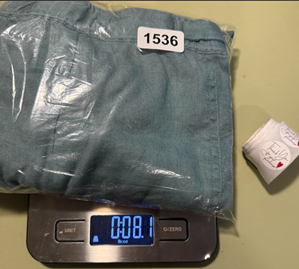
I fold the item, slide it into a Walmart bread bag, fold the opening neatly a couple of times, and seal it with tape on the back. On the front I add a thank you sticker and the next sequential inventory number sticker.
Then I put it on the scale and take one final photo — making sure both the inventory number sticker and the weight are clearly visible in the shot.
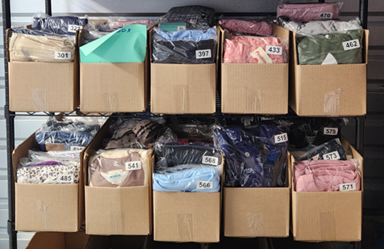
The item goes into the corrugated box in numerical order.
I use 24x8x6 corrugated boxes that fit perfectly on my six tier rolling metal shelf. When a box is full it goes to storage and I bring back an empty one. Every box holds items in sequential number order so I always know roughly where to look.
The SKU connection — how it all ties together
I use Nifty AI as my crosslisting tool. When I prep each listing there’s a SKU field — that’s where my inventory number goes. When I post across platforms that number travels with the listing everywhere.
So when something sells I see the Brand/Title and the SKU number. Even if I have 20 Ralph Lauren polo shirts in different boxes, the SKU numbers are unique. I go to the shelf, find the box with the matching SKU number, pull it, and I’m done. Under two minutes every time.
Pulling orders and shipping
When an item sells, pull the item first before you do anything else with shipping.
Find the item by SKU number, bring it to your shipping station, print your label, package it up and you’re done.
Once you’re ready to package, double check that the right order is going to the right customer before printing, sealing and shipping. Match the SKU and brand to the order. Right number, right brand — seal it and ship. If anything looks off, stop and double check before that package closes.
When you’re processing multiple orders at once this one habit eliminates the very real possibility of shipping the wrong item to the wrong person — and trust me, it’s a nightmare to sort out after the fact — I know from experience.
A full breakdown of the shipping process — including how to handle weights and labels across multiple platforms — is coming in a future article.
Track Your Inventory System for Resellers in a Spreadsheet
All of this physical system connects to a digital one. I have an inventory tracking spreadsheet where I log each item by inventory number when I’m prepping to list it. When it sells I update the same row with the sale information.
This means at any point I can see exactly what I have, what’s sold, and what’s pending. No guessing.
Start simple. Start today
You don’t need a complicated app or expensive software to run a real inventory system. You need a numbering method, a consistent packaging process, and a way to track it all that you’ll actually use.
Start simple. Number your items. Store them in order. Match your SKU before you seal anything. Those three habits alone will eliminate most of the panic that comes with selling at any real volume
Want to start tracking your inventory today? Grab the Free Basic Inventory Tracker in the shop. It covers the essentials and gets you started right away — and a more advanced version with additional tracking features is coming soon.